Explore cost-effective alternatives to expensive dental imaging software.
Last Updated: October 5, 2026
Dental practices face a real problem: imaging software has become expensive. A single comprehensive platform can demand significant monthly fees, especially when bundled with practice management features you may not need. For small practices or those focused primarily on cosmetic dentistry, this cost structure doesn't fit.
The challenge isn't just the price tag. It's that many practices overpay for features they'll never use while struggling to find affordable alternatives that actually work with their existing sensors and workflows. This creates a gap between what dentists need and what they can justify spending.
Understanding your options matters. Some practices discover that a focused imaging solution, rather than an all-in-one platform, delivers better value and faster implementation. Others find that cloud-based systems eliminate the upfront hardware investment entirely.
This guide breaks down the alternatives to expensive dental imaging software so you can make an informed choice for your practice.
When you evaluate dental imaging software pricing, you're paying for several distinct components. Understanding what drives cost helps you identify where you can save without sacrificing capability, and it's the difference between comparing sticker prices and comparing real cost.
The line items that actually appear on a quote
Most comprehensive platforms charge based on user seats, storage volume, and integration depth. A single-seat license might start at a baseline monthly fee, with additional costs for cloud storage, API integrations, and technical support.
A typical quote breaks down into these buckets:
Locally installed versus cloud economics
Locally installed systems often require upfront hardware investment plus ongoing licensing. You own the infrastructure but bear the cost of server maintenance, backups, and updates. Cloud-based systems shift this burden to the vendor, which is reflected in subscription pricing.
Total cost of ownership is the number that matters
A lower monthly fee doesn't guarantee better value if implementation takes months, training is extensive, or data migration creates workflow disruption. Practices often underestimate these hidden costs when comparing options. A useful way to model it:
Most practices find that the vendor with the lowest advertised monthly rate is rarely the lowest total cost once migration and training are counted.
Pro Tip
Ask every vendor for a written, itemized quote that separates license, storage, modules, implementation, training, and support. A vendor that won't itemize is usually hiding the real number.
Where the savings actually come from
The choice between cloud and locally installed dental imaging software shapes your entire technology strategy. Each approach carries different cost, performance, and operational implications.
Cloud-based systems eliminate server hardware and IT infrastructure costs. You access imaging through a web browser or mobile app from any location. This flexibility appeals to multi-location practices and those prioritizing remote access. Updates happen automatically without downtime. Backup and disaster recovery are handled by the vendor.
Locally installed systems give you complete control and ownership of your data. No recurring fees beyond licensing. Performance doesn't depend on internet speed. For practices with strict data privacy requirements or unreliable connectivity, local installation offers peace of mind. The tradeoff: you manage hardware, backups, security patches, and upgrades yourself. Upfront costs are higher.
For small practices, cloud-based solutions typically offer better economics. You avoid capital expenses and IT overhead. For high-volume imaging centers, local installation may justify the upfront investment through lower per-use costs over time.
Compatibility is where many practices discover hidden costs. Switching platforms often means replacing imaging sensors, an expensive proposition that eliminates the value of your existing investment.
The best alternatives to expensive dental imaging software work with sensors you already own. Look for platforms that support DEXIS, Sirona, Planmeca, Carestream, and other major manufacturers. This compatibility requirement narrows your options but prevents costly equipment replacement.
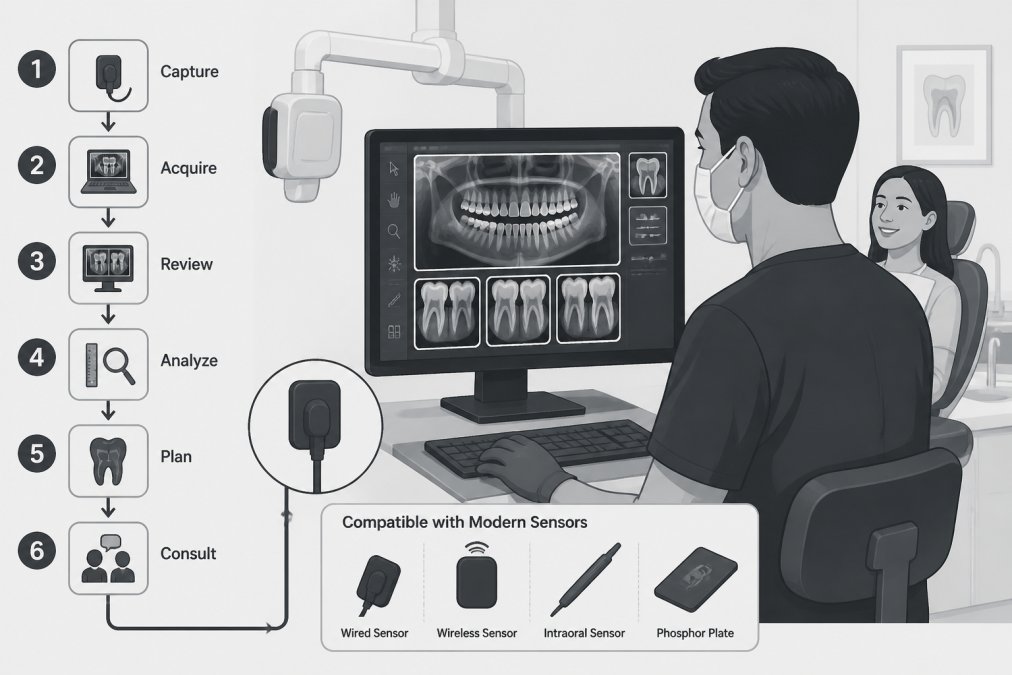
How compatibility is actually verified
"Compatible" is not a yes/no label. It breaks into four layers, and a platform can pass one and fail another:
The migration friction nobody quotes you
Before committing to an expensive new system, verify sensor compatibility with your prospective software. This single check can save thousands in unnecessary hardware replacement. But also ask what migrating your existing image archive looks like:
Watch Out
Get the vendor's compatibility and migration commitments in writing, including which sensor models and firmware revisions are supported and what happens if a future firmware update breaks the driver. Verbal assurances are not a migration plan.
Why this narrows your options, and why that's good
Hardware compatibility also affects workflow. A platform that integrates seamlessly with your existing sensors and practice management system reduces training time and implementation friction. Practices that skip this compatibility review often face months of workarounds and staff frustration.
A practical sequence before you switch:
Most practices find that two or three candidates survive step three, which makes the rest of the evaluation far faster.
Small practices, those with one to three operatories handling 20-50 patients daily, have fundamentally different needs than multi-location groups. Yet traditional dental imaging software pricing doesn't reflect this reality. You pay the same per-seat fees as larger practices despite lower imaging volume.
Imaging-only solutions serve small practices well. Rather than purchasing a full practice management platform, you invest in focused imaging software that handles radiographs, intraoral photos, and basic image analysis. This approach reduces cost and complexity while maintaining clinical capability.
Many small practices find that they don't need advanced AI screening, multi-location reporting, or enterprise-level analytics. A straightforward imaging platform with solid image storage, easy retrieval, and basic annotation tools meets their actual requirements.
Consider your imaging volume honestly. If you take 10-15 radiographs per day, you don't need infrastructure built for 100 daily images. Right-sizing your software to your actual practice size is the most direct path to lower costs.
This distinction shapes your entire decision. Many practices default to full practice management platforms because they assume they need everything in one system. In reality, imaging-only and full-suite platforms serve different purposes.
Imaging-only platforms excel at one job: managing dental images efficiently. They integrate with your existing practice management system rather than replacing it. This modular approach reduces cost and implementation complexity.
Full practice management platforms offer integration benefits if you're willing to migrate your entire workflow. For practices already satisfied with their scheduling and billing system, switching to an all-in-one platform creates unnecessary disruption.
The right choice depends on your current technology stack. If your practice management system works well, adding focused imaging software is simpler and cheaper than replacing everything. If you're starting from scratch or deeply unhappy with your current system, a full platform may justify the investment.
Cost extends beyond monthly subscriptions. Implementation, training, data migration, and ongoing support accumulate quickly. A platform that costs less monthly but requires expensive migration may actually cost more overall.
Image portability matters more than many practices realize. If you switch platforms later, can you export your images in standard formats?
Request explicit portability commitments from any vendor you consider. Can you export images in DICOM format? Can you download your entire image library? What's the process and cost for data retrieval if you discontinue service?
Small practices especially should prioritize portability. You may outgrow your current platform or discover better alternatives as the market evolves. Ensuring you can take your images with you protects your investment and your flexibility.
Choosing dental imaging software requires balancing cost, compatibility, and capability. The most expensive platform isn't always the best choice, especially for small practices or those with focused imaging needs.
Yes, many dental imaging software platforms are hardware-agnostic, meaning they work with sensors from multiple manufacturers. Before switching or purchasing new software, verify that your chosen platform supports your existing sensors. Hardware compatibility is a key factor in reducing total cost of ownership, since replacing imaging devices can cost thousands of dollars. Always request a compatibility list from the vendor before committing.
Cloud-based dental imaging software often has lower upfront costs since there's no server hardware to purchase or maintain on-site. However, subscription fees accumulate over time, and you depend on internet connectivity. Locally installed systems require higher initial investment but may offer lower per-year costs after the first few years. Compare total cost over a 3-5 year period rather than just the first-year price to make an accurate decision.
Prioritize hardware compatibility with your existing sensors, ease of use for your clinical team, image storage and retrieval speed, and integration with your practice management system. For small practices, consider whether the software supports multi-user access if you have multiple operatories. Verify that the vendor provides adequate training and technical support, and confirm that you own your image files or can export them if you switch platforms later.
Pricing varies widely based on whether you choose imaging-only software or a full practice management platform that includes imaging. Cloud-based solutions typically charge monthly subscriptions, while locally installed systems may require upfront licensing fees. The total cost depends on the number of users, storage volume, and support level. Visit the vendor's pricing page or request a quote based on your practice's specific needs to get accurate figures.
Show patients their future smile in about 90 seconds and close more cosmetic cases chairside.
Book a free demo
AI smile previews that help patients say yes, before, during, and after the consult.